
How to split your grocery shop between supermarkets and save money
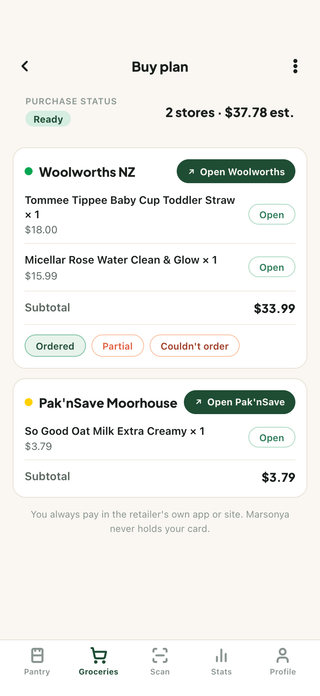
Compare the cost of your needed groceries at stores you can use, including travel and delivery charges. A second stop is worthwhile when the price differences cover those extra costs. Marsonya organises your shopping list into a per-store Buy Plan. You finish and pay for each purchase with the retailer.
Start with the groceries you need, based on the food already at home. A lower price at a second store helps only when you need the item and the saving covers the extra trip.
Marsonya keeps household food records and the next shopping plan together. Join the early-access list to hear when access opens.
Is it worth splitting your shop between two supermarkets?
It depends on your list and the costs of each stop. Consumer NZ’s June 2026 basket study found a 16-item basket at Pak’nSave averaged $84.38, about $5 a week cheaper than the loyalty-member average at New World and Woolworths, with fresh meat and produce excluded. Gaps vary item by item and week by week. The study compares baskets at individual stores; it does not establish what your household would save by splitting a shop.
Use a stock check to decide what to buy, then compare prices for that list. Marsonya keeps the food record and store plan together so you can check both while shopping.
When more than one person buys the household’s groceries, agree who is handling the shop. The family grocery-sharing guide explains how to use one common list and handle a hand-off between shoppers.
How can you plan a split without making separate price lists?
- Choose the groceries still needed. Use the food already at home and the meals you expect to make as a starting point for one shopping list.
- See the estimated store plans. Buy Plan uses available store prices to estimate a one-store plan or split the purchases between stores, without copying a list for each stop.
- Choose the practical option. Consider the estimated saving alongside extra travel, time and delivery or pickup charges. A one-store plan may suit the household better.
- Finish with the retailer. Continue through the store links and complete checkout there. The retailer confirms the final price, availability and charges.
How does Marsonya turn your list into a buy plan?
- Buy Plan with cheapest splitcompare a split across stores with a one-stop shop
- Per-store checkout hand-offretailer links let you continue shopping; you complete checkout and pay there
- Food records beside the shopping planhousehold stock and the purchases still needed stay together
- Price-drift and substitution warnings
What else do people ask about split shopping?
Does Marsonya place the order for me?
No. A Buy Plan organises the list by store and provides retailer links to continue shopping. You complete checkout on the retailer's own website or app. Marsonya never holds your card or places the order for you.
Which stores does Marsonya cover?
Marsonya compares available listings for selected Woolworths, Pak'nSave and New World stores. Prices refresh on a nightly schedule; the retailer confirms current availability and final prices at checkout.
Is splitting worth it for a small household?
Not always. Compare the saving on the needed items with the extra travel, time and fees. For a small basket, those costs may outweigh the price differences. Marsonya's one-stop option lets you compare the list at a single store.
Can I still shop at just one store?
Yes. One-stop mode compares the list's total at each store. Use that comparison alongside travel or delivery costs to decide whether one stop suits you better than a split.